 Rustango
 Sending email
Welcome messages, password resets, receipts, alerts — most apps send
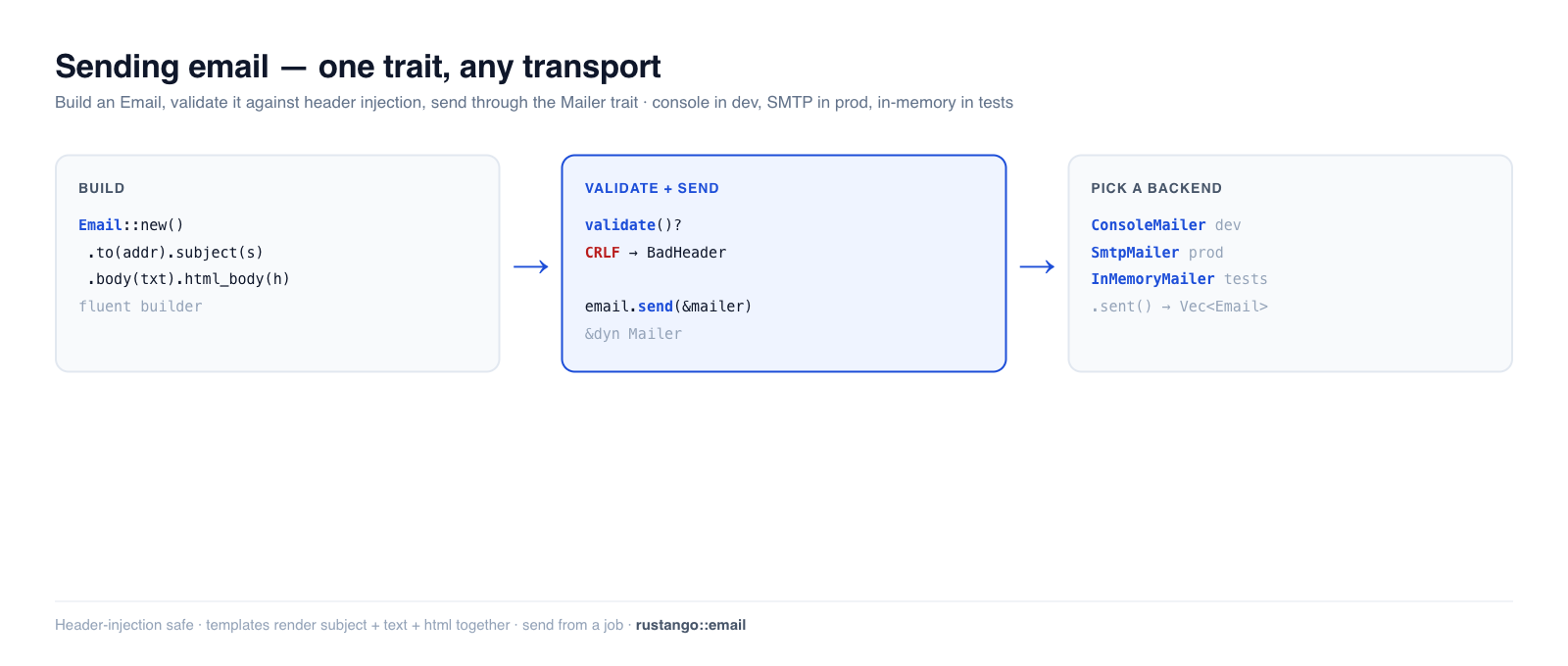
transactional email. Rustango gives you a Mailer trait with swappable
backends (console for dev, SMTP for production, an in-memory recorder for tests),
a fluent Email builder with header-injection protection, and template
rendering. Write mailer.send(&email) once; switch from printing to your
terminal to real SMTP with a one-line change — like Django's email framework.
New to a term here? transactional email, SMTP, mailer backend — see the glossary.
Source:
rustango::email(Mailer,ConsoleMailer,InMemoryMailer,NullMailer,SmtpMailer,BoxedMailer,send_mail,MailError) — behind theemail-smtpfeature.Runnable version: every snippet is copied from
email_doc.rs(cargo test -p rustango --test email_doc); the send helpers and attachments are dogfooded byemail_send_helpers.rsandemail_attachments.rs.
Table of contents
- Step 1 — Build an email
- Step 2 — Pick a mailer
- Step 3 — Send it
- Validation and header-injection safety
- Testing email
- Templates
- Send it off the request
- Reference
- See also
Step 1 — Build an email
Email is a fluent builder. Set recipients, subject, and a text and/or HTML
body:
use rustango::email::Email;

let email = Email::new()
    .to("ada@example.com")
    .from("noreply@example.com")
    .subject("Welcome")
    .body("Thanks for signing up.")              // plain-text part
    .html_body("<p>Thanks for signing up.</p>"); // optional HTML part
.cc(...), .reply_to(...), and attachments are available too.
Step 2 — Pick a mailer
Every backend implements Mailer, so your code never names the concrete type —
hold a BoxedMailer (Arc<dyn Mailer>):
| Backend | Feature | Use for |
|---|---|---|
ConsoleMailer | email | dev — prints the message to stdout |
SmtpMailer | email-smtp | production — real delivery over SMTP |
InMemoryMailer | email | tests — records messages, sends nothing |
FileMailer | email | dev/CI — writes each message to a file |
NullMailer | email | disable email entirely |
Build it from config so it differs per environment (ConsoleMailer locally,
SmtpMailer in prod) via email::from_settings(&settings.email).
Step 3 — Send it
Email::send takes any &dyn Mailer:
email.send(&mailer).await?;
For a quick one-off, send_mail skips the builder:
use rustango::email::send_mail;

send_mail(
    &mailer,
    "Your report is ready",                  // subject
    "Download it from your dashboard.",      // body
    Some("noreply@example.com"),             // from (or None for the default)
    &["ops@example.com", "qa@example.com"],  // recipients
).await?;
send_many sends a batch in one call.
Validation and header-injection safety
Email::validate() runs before sending (and you can call it yourself). It
rejects incomplete messages and defends against header injection — a newline
smuggled into a header is how attackers add a hidden Bcc:
// Missing recipients or an empty subject → MailError::InvalidMessage
Email::new().subject("hi").validate()?;          // Err: no recipients

// A CRLF in any header field → MailError::BadHeader (Django's BadHeaderError)
Email::new()
    .to("a@example.com")
    .subject("Hello\r\nBcc: victim@example.com")  // injection attempt
    .body("x")
    .validate()?;                                  // Err: BadHeader
Both are verified in the backing test.
Testing email
Use InMemoryMailer — it records every message instead of sending, so tests
assert on what would have gone out, with no network:
use rustango::email::InMemoryMailer;

let mailer = InMemoryMailer::new();
welcome_flow(&mailer).await?;          // your code under test

let sent = mailer.sent();              // Vec<Email>
assert_eq!(sent.len(), 1);
assert_eq!(sent[0].to, vec!["ada@example.com".to_string()]);
assert_eq!(sent[0].subject, "Welcome");
Templates
For anything beyond a line of text, render the body from a Tera
template instead of inlining HTML. The email_templates feature's EmailRenderer
follows a name.subject.txt / name.txt / name.html convention — one template
set produces the subject, the plain-text part, and the HTML part together, so the
three never drift. The Mailable trait packages "a thing that knows how to turn
itself into an Email" for reusable messages.
Send it off the request
Sending email inline makes the user wait on your SMTP server and couples the response to its availability. Send it from a background job instead — the handler returns immediately and a worker delivers it (with retries if SMTP is down):
// in the handler: enqueue, don't send inline
queue.dispatch(&SendWelcomeEmail { user_id }).await?;

// the job (see the Background jobs guide):
async fn run(&self) -> Result<(), JobError> {
    let email = Email::new().to(/* ... */).subject("Welcome").body("...");
    email.send(&*mailer).await.map_err(|e| JobError::Retryable(e.to_string()))?;
    Ok(())
}
The email_jobs feature wires this up for you.
Reference
Email builder: to · cc · from · reply_to · subject · body ·
html_body · attachments · validate() · send(&mailer).
Helpers: send_mail(mailer, subject, body, from, &recipients) ·
send_many(mailer, &emails) · from_settings(&EmailSettings).
MailError: InvalidMessage (incomplete) · BadHeader (CRLF injection) ·
Transport (backend/delivery failure).
See also
- Background jobs — deliver email off the request with retries.
- Account flows — password-reset / verification / magic-link emails built on this.
- HTML views — the Tera engine email templates also use.
- Caching — the same swap-the-backend trait pattern.