 Rustango
 HTML views — server-rendered pages
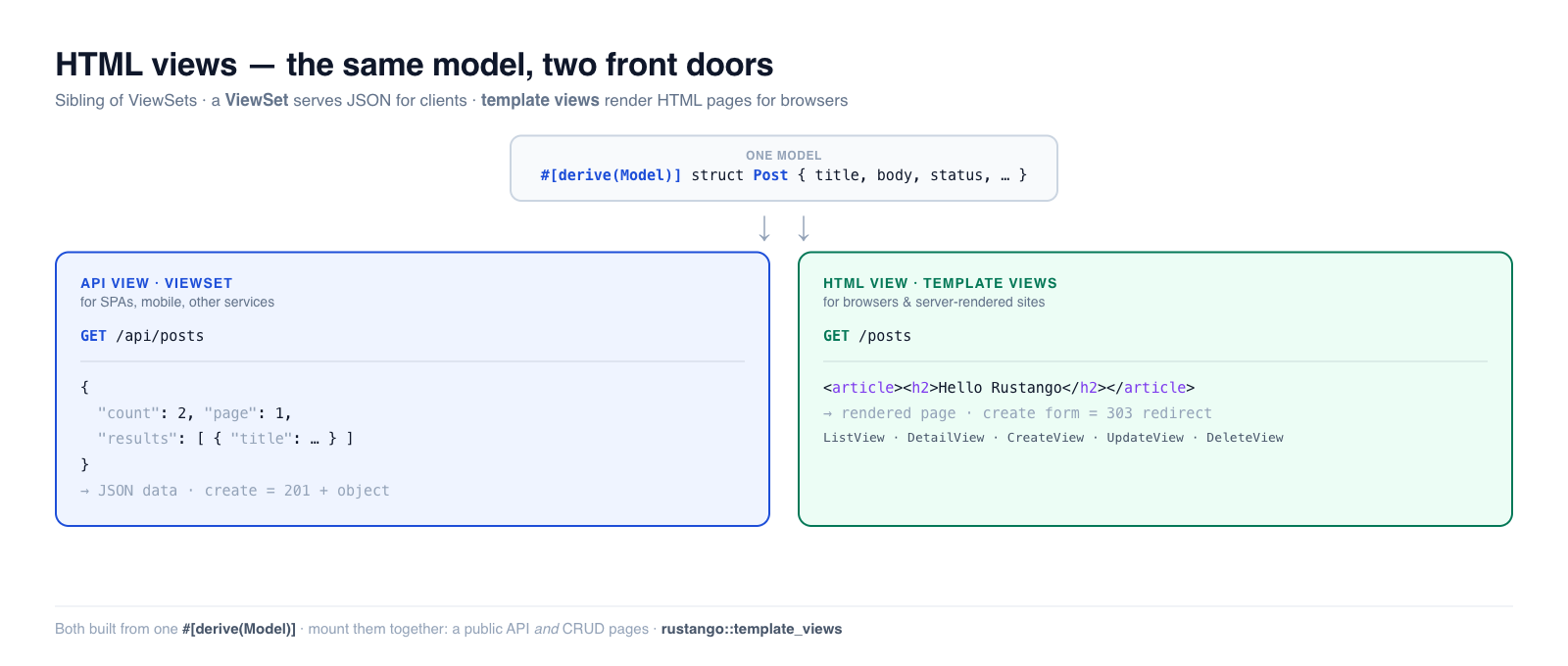
An HTML view turns a model into server-rendered web pages — a list page, a
detail page, and create/edit/delete forms — from one declaration. It's the
sibling of ViewSets: where a ViewSet emits JSON for API
clients, an HTML view emits a rendered page for a browser. Both are built from
the same #[derive(Model)], and you can serve a model both ways at once.
These are Rustango's equivalent of Django's generic class-based views
(ListView, DetailView, CreateView, UpdateView, DeleteView) or Laravel's
resource controllers returning Blade views. They render through Tera
templates.
New to a term here? If model, template, router or server-rendered are unfamiliar, the glossary explains each in plain language.
Source:
rustango::template_views(ListView,DetailView,CreateView,UpdateView,DeleteView,TemplateView,RedirectView) — behind thetemplate_viewsfeature (on by default).Runnable version: the API-vs-HTML example below is pinned by the framework test
html_and_api_contrast_sqlite_live.rs(cargo test -p rustango --features sqlite --test html_and_api_contrast_sqlite_live). The individual views are covered bytemplate_view.rsandtemplate_views_context_object_name_sqlite_live.rs.
Table of contents
- API views vs HTML views — which do you want?
- The five model views
- ListView · DetailView
- CreateView, UpdateView, DeleteView
- The Tera context
- TemplateView and RedirectView
- Single-tenant vs multi-tenant
- Serving one model both ways
- See also
API views vs HTML views — which do you want?
This is the first decision. Both turn a model into endpoints; they differ in what comes out and who's calling.
| API view — ViewSet | HTML view — this guide | |
|---|---|---|
| Module | rustango::viewset | rustango::template_views |
| Sends back | JSON data | a server-rendered HTML page |
| Built for | SPAs, mobile apps, other services | browsers, server-rendered sites, admin-style CRUD |
| A "create" | POST JSON → 201 + the new object | POST a form → 303 redirect to a success page |
| On bad input | 400 + a field-keyed JSON error map | re-render the form with the errors shown |
| Reads a list as | a paginated JSON envelope | a <table>/loop in your template |
| Usually authed by | tokens / JWT / API keys | session cookies |
| Django analogue | DRF ModelViewSet | generic class-based views |
You don't have to choose globally — pick per resource, and you can mount both on the same model (see below). Rules of thumb:
- Building a JSON backend for a frontend framework or mobile app → ViewSet.
- Building a server-rendered site (the server returns HTML pages) → HTML views.
- Need both (a public API and internal CRUD pages) → mount both.
Looking for the JSON side? It has its own deep-dive: ViewSets — CRUD REST APIs.
The five model views
Each view is for_model(SCHEMA) plus a .router(prefix, tera, pool). Mounting
them at the same prefix (say /posts) gives the classic CRUD URL set:
| View | Renders | Routes mounted | Default template |
|---|---|---|---|
ListView | a paginated list | GET <prefix> | <table>_list.html |
DetailView | one row | GET <prefix>/{pk} | <table>_detail.html |
CreateView | a new-record form | GET/POST <prefix>/new | <table>_form.html |
UpdateView | a prefilled edit form | GET/POST <prefix>/{pk}/edit | <table>_form.html |
DeleteView | a confirm page | GET/POST <prefix>/{pk}/delete | <table>_confirm_delete.html |
<table> is the model's table name, so a Post (table posts) looks for
posts_list.html, posts_detail.html, and so on. Override any of them with
.template("my_name.html").
ListView
A paginated list page. You provide a template that loops over object_list;
the view handles paging, ordering, filtering and search from query params.
use rustango::template_views::ListView;
use std::sync::Arc;
use tera::Tera;

let app = ListView::for_model(Post::SCHEMA)
    .page_size(20)                       // rows per page (?page=N to navigate)
    .order_by("published_at", true)      // default sort, true = DESC
    .filter_fields(&["status", "author_id"])  // ?status=published
    .search_fields(&["title", "body"])        // ?search=rust
    .router("/posts", Arc::new(tera), pool);
A matching posts_list.html — note object_list and the pagination variables
the view stamps for you:
<h1>Posts ({{ total }})</h1>
{% for post in object_list %}
  <article>
    <h2><a href="/posts/{{ post.id }}">{{ post.title }}</a></h2>
    <p>{{ post.body }}</p>
  </article>
{% endfor %}

{% if has_prev %}<a href="?page={{ page - 1 }}">← prev</a>{% endif %}
page {{ page }} / {{ total_pages }}
{% if has_next %}<a href="?page={{ page + 1 }}">next →</a>{% endif %}
?page=, ?status=, ?search= and ?ordering= work the same as on a ViewSet
list — the difference is purely that the result is a rendered page rather than a
JSON envelope. Use .context_object_name("posts") if you'd rather loop over
posts than object_list in the template.
DetailView
One row, looked up from the URL. By default it matches the primary key
(/posts/42); point it at another column with .lookup_field("slug") for
pretty URLs (/posts/my-first-post). A missing row is a 404.
use rustango::template_views::DetailView;

let app = DetailView::for_model(Post::SCHEMA)
    .lookup_field("slug")          // GET /posts/{slug} instead of /posts/{id}
    .router("/posts", Arc::new(tera), pool);
The template gets the row as object:
<h1>{{ object.title }}</h1>
<p>{{ object.body }}</p>
<small>by author #{{ object.author_id }}</small>
CreateView, UpdateView, DeleteView
The write side. Each handles a GET (render a form / confirm page) and a POST
(do the work, then redirect). The redirect-after-POST is the standard
Post/Redirect/Get pattern — it stops a browser refresh from re-submitting.
CreateView — GET /posts/new renders an empty form; POST /posts/new
inserts the row and 303s to success_url:
use rustango::template_views::CreateView;

let app = CreateView::for_model(Post::SCHEMA)
    .success_url("/posts")         // where to send the browser after a save
    .router("/posts", Arc::new(tera), pool);
The form template (posts_form.html) is shared with UpdateView. is_update
tells the two apart, and errors carries any validation messages back:
<form method="post">
  <input name="title" value="{{ object.title | default(value='') }}">
  <textarea name="body">{{ object.body | default(value='') }}</textarea>
  {% for field, msgs in errors %}
    <p class="error">{{ field }}: {{ msgs | join(sep=', ') }}</p>
  {% endfor %}
  <button>{% if is_update %}Save{% else %}Create{% endif %}</button>
</form>
Validation. Schema rules (type, max_length, NOT NULL…) are enforced
automatically. Add your own with a closure validator — on Err, the form
re-renders with the messages and a 422 status instead of saving:
use rustango::forms::FormErrors;

CreateView::for_model(Post::SCHEMA)
    .validator(|data| {
        let mut errs = FormErrors::default();
        if data.get("title").map_or(true, |t| t.len() < 5) {
            errs.add("title", "must be at least 5 characters");
        }
        if errs.is_empty() { Ok(()) } else { Err(errs) }
    })
    .success_url("/posts")
    .router("/posts", Arc::new(tera), pool);
You can also reuse a #[derive(Form)] struct's validators with .form::<F>()
(validation-only for now — see the API docs).
UpdateView — GET /posts/{pk}/edit renders the same form prefilled from the
row (object is populated, is_update is true); POST updates and 303s.
use rustango::template_views::UpdateView;

UpdateView::for_model(Post::SCHEMA)
    .success_url("/posts")
    .router("/posts", Arc::new(tera), pool);
DeleteView — GET /posts/{pk}/delete renders a confirmation page
(posts_confirm_delete.html, with object); POST deletes and 303s.
use rustango::template_views::DeleteView;

DeleteView::for_model(Post::SCHEMA)
    .success_url("/posts")
    .router("/posts", Arc::new(tera), pool);
Mount all five at the same prefix and you have full HTML CRUD:
let app = axum::Router::new()
    .merge(ListView::for_model(Post::SCHEMA).router("/posts", tera.clone(), pool.clone()))
    .merge(DetailView::for_model(Post::SCHEMA).router("/posts", tera.clone(), pool.clone()))
    .merge(CreateView::for_model(Post::SCHEMA).success_url("/posts").router("/posts", tera.clone(), pool.clone()))
    .merge(UpdateView::for_model(Post::SCHEMA).success_url("/posts").router("/posts", tera.clone(), pool.clone()))
    .merge(DeleteView::for_model(Post::SCHEMA).success_url("/posts").router("/posts", tera, pool));
The Tera context
Every view stamps a consistent context so templates port cleanly between them:
| View | Variables available in the template |
|---|---|
ListView | object_list (the page's rows), page, page_size, total, total_pages, has_next, has_prev |
DetailView | object (the row) |
CreateView / UpdateView | object (empty on create, prefilled on update), is_update (bool), errors, values |
DeleteView | object (the row to confirm) |
Rows are exposed as plain maps keyed by column name ({{ post.title }}), with
SQL NULL rendered as null. Use .context_object_name("posts" / "post") to
add a friendlier alias alongside object_list / object.
TemplateView and RedirectView
Two model-free helpers for the pages every site has:
TemplateView — render a static template with a fixed context (an "about" page, a landing page). No model, no database:
use rustango::template_views::TemplateView;

let app = TemplateView::new("about.html")
    .context_value("title", "About us")
    .router("/about", Arc::new(tera));
RedirectView — a permanent or temporary redirect at a URL (for moved pages):
use rustango::template_views::RedirectView;

let app = RedirectView::to("/posts").router("/old-posts");
Single-tenant vs multi-tenant
Every model view ships two router constructors — same builder, pick the one that matches how your app manages database connections:
.router(prefix, tera, pool)— single-tenant; captures one pool at mount time. This is what the examples above use..tenant_router(prefix, tera)— multi-tenant; resolves a per-request connection from theTenantextractor. Available with thetemplate_views+tenancyfeatures. Templates port between the two unchanged.
This mirrors the ViewSet split (router / router_pool vs tenant_router).
Serving one model both ways
You're not limited to one front door. Mount a JSON API and HTML pages over the same model and pool — a public API for clients, server-rendered pages for people:
use rustango::viewset::ViewSet;
use rustango::template_views::{ListView, DetailView};

let app = axum::Router::new()
    // JSON for API clients:
    .merge(ViewSet::for_model(Post::SCHEMA).router_pool("/api/posts", pool.clone()))
    // HTML pages for browsers:
    .merge(ListView::for_model(Post::SCHEMA).router("/posts", tera.clone(), pool.clone()))
    .merge(DetailView::for_model(Post::SCHEMA).router("/posts", tera, pool));
Now GET /api/posts returns the paginated JSON envelope and GET /posts
returns a rendered HTML list — same rows, same pool, two shapes. This exact
setup is what the backing test
asserts.
See also
- ViewSets — CRUD REST APIs — the JSON/API counterpart, in depth.
- Admin — the auto-generated admin is built on these same views.
- URLs & routing — how to compose these routers into your app.
- Serializers — shape the JSON when you go the API route.