 Rustango
 JWT (standalone)
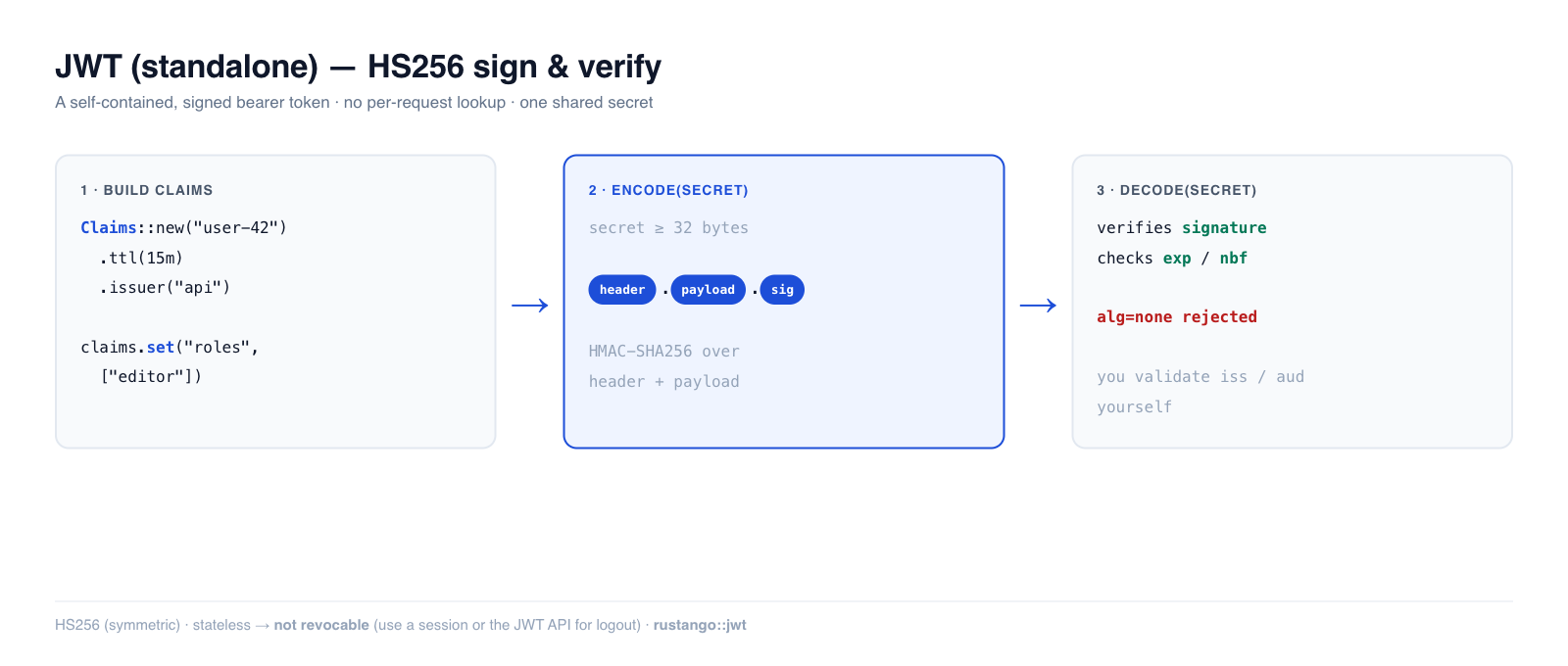
A JSON Web Token is a stateless credential: a signed, self-contained string
the client sends on every request, that your server verifies with a secret —
no per-request database or cache lookup. Rustango's rustango::jwt module is
the minimal building block: encode to sign claims, decode to verify and read
them back, HS256 under the hood.
Source:
rustango::jwt(Claims,encode,decode,decode_at,decode_unverified,JwtError) — behind thejwtfeature (on by default). For a batteries-included access+refresh API with revocation, see JWT auth API.Runnable version: snippets are copied from the tested
auth_demo—cargo test -p auth_demo --test auth_jwt.
New to a term here? JWT, claims, stateless, secret — see the glossary.
Deep dive companion to the Security guide's "Issuing and refreshing JWTs" section.
Table of contents
- Quick start · When to use it
- Building claims · Verifying
- Security model — read this · Inspecting without trust
- Notes & limits
Quick start
use rustango::jwt::{Claims, encode, decode};
use std::time::Duration;

// HS256 is symmetric — the same secret signs and verifies. Must be >= 32 bytes.
let secret = b"a-shared-signing-secret-at-least-32-bytes!!";

let mut claims = Claims::new("user-42").ttl(Duration::from_secs(900));
claims.set("roles", vec!["editor", "author"]);

let token = encode(&claims, secret)?;        // header.payload.signature

let verified = decode(&token, secret)?;       // checks signature + exp/nbf
assert_eq!(verified.subject(), Some("user-42"));
let roles: Vec<String> = verified.get("roles").unwrap();
When to use standalone JWT
Reach for rustango::jwt when you want a plain signed token and will handle the
lifecycle yourself:
- Magic-link / one-time tokens — a few claims (user id, purpose, short
exp). See Magic links & auth flows. - Service-to-service bearer tokens (the JWT sibling of HMAC request signing — HMAC for AWS-style canonical requests, JWT for a stateless bearer).
- SSO tokens you hand to a third party.
If you want a turnkey login → access + refresh → refresh → logout API with token revocation, don't build it on this — use JWT auth API, which wraps this module with rotation + a revocation store. And if you need to forcibly log a user out now, prefer a revocable Session: a plain JWT is valid until it expires.
Building claims
Claims wraps a JSON object, so standard claims and your own extension fields
coexist:
let mut claims = Claims::new("user-42")     // sets `sub` + `iat=now`
    .ttl(Duration::from_secs(3600))         // sets `iat`=now and `exp`=now+ttl
    .issuer("api.example.com")              // `iss`
    .audience("web-client")                 // `aud`
    .jti("unique-token-id");                // `jti` (for your own blocklist)
claims.set("role", "admin");                // any Serialize value
claims.set("org_id", 7_i64);
| Builder / setter | Claim |
|---|---|
Claims::new(sub) | sub + iat |
Claims::empty() | none (full control) |
.ttl(Duration) | iat (now) + exp (now+ttl) |
.expires_at(secs) / .not_before(secs) | absolute exp / nbf |
.issuer(s) / .audience(s) / .jti(s) | iss / aud / jti |
.set(name, value) | any custom claim |
Read them back with .subject() and .get::<T>(name) (returns None for a
missing or wrong-typed claim).
Verifying a token
use rustango::jwt::{decode, JwtError};

match decode(&token, secret) {
    Ok(claims) => { /* trust claims.subject() etc. */ }
    Err(JwtError::Expired(_))      => { /* 401 — token aged out */ }
    Err(JwtError::BadSignature)    => { /* 401 — forged or wrong key */ }
    Err(JwtError::NotYetValid(_))  => { /* nbf in the future */ }
    Err(_)                         => { /* malformed / unsupported alg */ }
}
decode verifies the signature, then exp and nbf. To test clock-window
behavior (or add skew tolerance), decode_at(token, secret, now) lets you pin
the "current" second:
let token = encode(&Claims::new("x").expires_at(1000), secret)?;
assert!(decode_at(&token, secret, 500).is_ok());                     // before exp
assert!(matches!(decode_at(&token, secret, 2000), Err(JwtError::Expired(_)))); // after
Security model
This is auth-boundary code — three things you must know:
-
decodedoes NOT validateiss/aud. A valid signature proves the token was minted with your secret, not that it was minted for your service. If you setiss/audat issue time, check them yourself on the decoded claims:let c = decode(&token, secret)?; if c.get::<String>("aud").as_deref() != Some("web-client") { return Err("wrong audience"); } -
The secret must be ≥ 32 bytes —
encoderefuses to sign with a shorter key (a short key is guessable, and a guessable HMAC key means forgeable tokens). HS256 is symmetric: anyone with the verify secret can also mint tokens, so it stays inside your trust boundary (single service / shared backend). Cross-org token issuance wants asymmetric RS256/ES256, which this module deliberately doesn't ship. -
alg=noneand tampering are rejected.decodepins HS256 (the classic "alg: none" forgery is refused), and any change to the header or payload breaks the signature — verified by a constant-time comparison.
There is no clock-skew leeway: exp/nbf compare against the exact current
second. If issuer and verifier clocks drift, subtract a few seconds via
decode_at.
Inspecting without verifying
decode_unverified reads the payload without checking the signature or
expiry — useful only to peek at a claim (e.g. a key id) so you can pick the right
secret, then call decode for real.
let peek = rustango::jwt::decode_unverified(&token)?;   // NOT trusted
let kid = peek.get::<String>("kid");
// ... look up the secret for `kid`, then verify properly:
let claims = decode(&token, &resolved_secret)?;
Never authorize on decode_unverified output — it carries no integrity
guarantee.
Notes and limits
- HS256 only — symmetric, single shared secret. No RS256/ES256 (keeps the always-on dep tree small; most single-service apps use HS256 anyway).
- Stateless = not revocable. A plain JWT is valid until
exp. If you need "log out now" / per-token revocation, use JWT auth API (JTI blocklist) or a Session (delete the server entry). - Keep
expshort for access tokens (minutes). Long-lived plain JWTs are a liability precisely because they can't be revoked. - Pair issuance with Passwords (verify, then issue) and
gate API routes via the auth backend chain's
JwtBackend.